

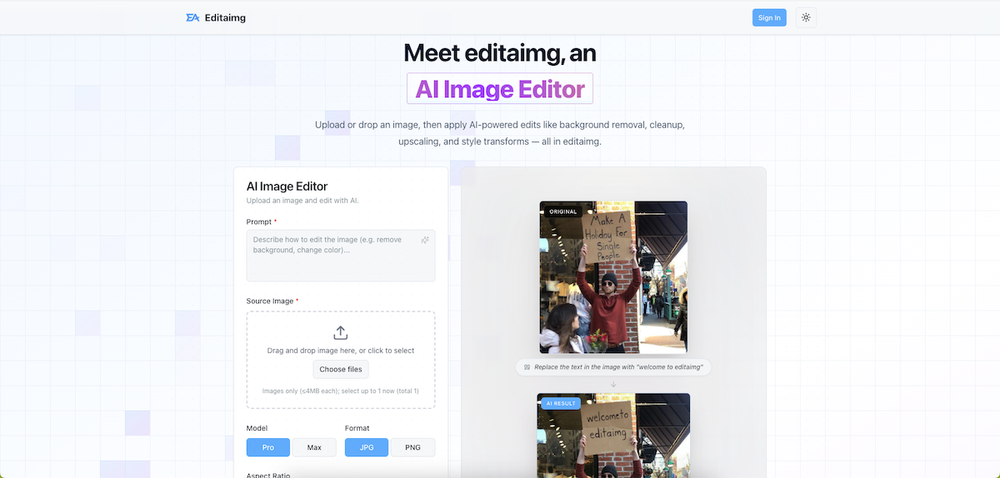
Editaimg is a sophisticated AI-powered online photo editor designed to empower users with professional-grade image manipulation capabilities, accessible through an intuitive web interface. The platform leverages advanced artificial intelligence to streamline complex editing tasks, making high-quality image enhancement accessible to a broad audience, from casual users to professional designers.
Core Features and Functionality:
-
AI Image Editing: At its heart, Editaimg offers a suite of AI-driven tools that automate and simplify common and advanced photo editing processes. This includes:
- Background Removal: Effortlessly remove backgrounds from images with a single click. This feature is invaluable for e-commerce product photography, creating transparent overlays, or isolating subjects for creative compositions.
- Object Removal/Cleanup: The AI can intelligently identify and remove unwanted objects, blemishes, or distractions from photos. This is useful for cleaning up landscapes, removing photobombers, or perfecting product shots.
- Image Upscaling: Enhance the resolution of images, improving clarity and detail without introducing artifacts. This is particularly beneficial for preparing low-resolution images for print or large-format displays.
- Style Transforms: Apply artistic styles, color grading, and lighting adjustments to transform the overall look and feel of an image, allowing for creative experimentation and unique visual outputs.
- Text Editing on Images: Edit existing text within images or add new text with AI assistance, providing flexibility for graphic design and content creation.
- Face Retouching: Enhance facial features for portraits, offering subtle improvements to skin texture, lighting, and overall appearance.
-
User-Friendly Interface: Editaimg is built with a focus on user experience. The platform features a clean, intuitive interface that allows users to upload, edit, and export images with ease. The drag-and-drop functionality for image uploads and the clear layout of editing tools ensure a smooth workflow.
-
Prompt-Based Editing: Users can describe their desired edits using natural language prompts. For example, a user might input "remove people from the background" or "place this bottle on the kitchen sink." The AI interprets these prompts to perform the requested modifications.
-
Quality and Aspect Ratio Control: The platform provides options to select the desired output quality (e.g., 1K, 2K) and aspect ratio (e.g., 1:1, 4:3, 16:9), giving users control over the final image dimensions and resolution.
-
Real-time Previews and Instant Results: Editaimg offers instant previews of edits, allowing users to see the impact of their changes in real-time. This iterative process helps in achieving the desired outcome quickly.
-
Multiple Image Uploads: Users can upload multiple images simultaneously (up to 8) for batch processing or to compare different editing approaches.
-
Export Options: Processed images can be exported in popular formats, ensuring compatibility with various platforms and applications.
Target Audience and Use Cases:
Editaimg caters to a diverse user base, including:
- E-commerce Businesses: For creating professional product photos with clean backgrounds, consistent styling, and high resolution, crucial for online sales platforms.
- Graphic Designers and Content Creators: To quickly generate assets, enhance visuals for social media, blogs, or marketing materials, and experiment with different artistic styles.
- Photographers: For retouching portraits, cleaning up landscape shots, and upscaling images for print or digital use.
- Social Media Managers: To create engaging visuals, remove unwanted elements from photos, and ensure brand consistency across platforms.
- Casual Users: Anyone looking to easily improve their personal photos, remove distractions, or apply creative effects without needing advanced technical skills.
Unique Selling Points:
Editaimg differentiates itself through its powerful AI capabilities combined with an accessible user interface. The ability to perform complex edits like object removal and background replacement using simple text prompts sets it apart. The platform's focus on speed, ease of use, and professional-quality output makes it a valuable tool for anyone working with digital images. The inclusion of features like AI upscaling and style transforms further enhances its versatility, positioning it as a comprehensive solution for a wide range of image editing needs.
The website also features a blog with tutorials and guides, such as "How to Remove Gemini Watermark" and "Remove Object from Photo," demonstrating practical applications and providing value-added content for users. The pricing structure offers one-time payment packages, providing flexibility and avoiding recurring subscription costs for users who prefer a pay-as-you-go model. This approach makes advanced AI image editing accessible and cost-effective.


