

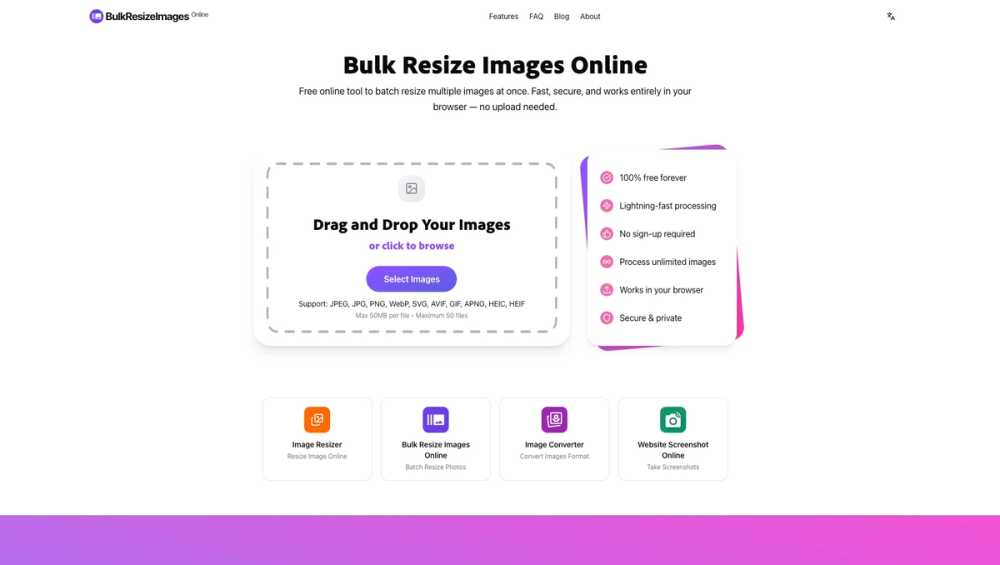
BulkResizeImages.online: Revolutionizing Image Resizing with Browser-Based Power
In today's digital landscape, images are the cornerstone of communication, marketing, and creative expression. Whether you're a photographer preparing a portfolio, a web developer optimizing assets for faster load times, a small business owner managing product listings, or a social media manager crafting engaging content, the need to resize images efficiently and effectively is paramount. However, traditional image resizing tools often come with significant drawbacks: lengthy upload processes, privacy concerns due to server-side processing, limitations on file numbers or sizes, and the need for software installation. BulkResizeImages.online emerges as a groundbreaking solution, offering a powerful, free, and secure platform that performs all image resizing operations directly within your web browser.
The Core Problem: Inefficient and Insecure Image Resizing
Many existing online tools and desktop software solutions for image resizing present a series of challenges:
- Upload/Download Bottlenecks: Uploading multiple large image files can be time-consuming and bandwidth-intensive. Similarly, downloading individually resized images or even a batch of them can be a slow process, especially with limited internet connectivity.
- Privacy and Security Risks: Sending your images to a third-party server for processing raises valid privacy concerns. Sensitive personal photos, proprietary business assets, or unreleased creative work could be exposed to potential data breaches or misuse.
- Usage Limitations: Free tiers of many services impose strict limits on the number of images you can process, the maximum file size, or the resolution you can achieve. Paid tiers can become expensive, especially for users with high-volume needs.
- Software Installation: Desktop applications require installation, updates, and can consume significant local storage and processing power, often with a steep learning curve.
- Lack of Advanced Features: Many basic tools offer only simple resizing options, lacking the advanced algorithms or customization needed for professional results.
BulkResizeImages.online: The Browser-Native Solution
BulkResizeImages.online tackles these issues head-on by leveraging the power and security of modern web technologies. It's built on a foundation of client-side processing, meaning all the heavy lifting happens directly on your device, eliminating the need for uploads and ensuring your data never leaves your control.
Key Features and Technical Underpinnings:
-
100% Client-Side Processing (Zero-Upload Guarantee):
- Technology: The platform utilizes WebAssembly (WASM) and multi-threaded web workers. WebAssembly allows near-native performance for computationally intensive tasks like image manipulation directly in the browser. Multi-threading enables parallel processing, significantly speeding up batch operations.
- Security: Because images are processed locally, they never touch external servers. This provides an unparalleled level of privacy and security, making it ideal for sensitive or confidential image data. You can even disconnect your internet after loading the page, and the tool will continue to function.
- Benefits: Eliminates upload/download times, reduces bandwidth consumption, and guarantees data privacy.
-
High-Performance Processing Engine:
- WebAssembly (WASM): This is the core technology enabling desktop-like performance. WASM modules are compiled from languages like C++ or Rust, allowing complex algorithms to run efficiently in the browser sandbox.
- Multi-threading: Web workers allow the browser to perform tasks in the background without freezing the user interface. For image resizing, this means multiple images can be processed simultaneously, drastically reducing the time required for batch operations.
- Optimized Algorithms: The platform employs advanced image processing libraries, including the Lanczos3 resampling algorithm (via Pica.js), which is renowned for its high-quality downscaling, preserving sharpness and detail better than simpler algorithms like bilinear or nearest-neighbor.
-
Versatile Resizing Options:
- Percentage-Based Resizing: Scale images proportionally by a chosen percentage (e.g., 50%, 150%). This is useful for general adjustments and maintaining aspect ratios easily.
- Exact Dimensions (Width x Height): Specify precise pixel dimensions for width and height. This is crucial for meeting specific requirements for social media posts, website layouts, or print materials.
- Maintain Aspect Ratio: An essential feature that ensures images are not distorted when resizing. Users can choose to maintain the original aspect ratio, either by setting a target width or height, or by using padding to fit within specified dimensions.
- Longest Side Resizing: Set the desired length for the longest dimension of the image, automatically calculating the other dimension to preserve the aspect ratio. This is a common requirement for many web and print applications.
- Target File Size: A powerful feature that allows users to specify a target file size (in KB). The tool intelligently compresses and resizes images to get as close as possible to this target, balancing quality and file size. This is invaluable for optimizing web performance and meeting platform upload limits.
-
Broad Format Support:
- Input: Supports common image formats including JPEG, JPG, PNG, WebP, SVG, AVIF, GIF, APNG, HEIC, and HEIF.
- Output: Offers flexibility in choosing the output format, typically JPEG, PNG, and WebP, allowing users to select the best format for their needs (e.g., WebP for superior compression, JPEG for broad compatibility, PNG for transparency).
-
Professional Quality Output:
- Lanczos3 Resampling: As mentioned, this algorithm provides superior image quality for downscaling, minimizing aliasing and preserving fine details.
- Color Accuracy: Strict adherence to sRGB color profiles ensures that images maintain their intended colors across different devices and platforms.
- Smart Compression: Advanced compression techniques are used to reduce file size without significant loss of visual quality, especially when targeting specific file sizes or using formats like WebP.
-
User-Friendly Interface:
- Drag-and-Drop Functionality: An intuitive interface allows users to simply drag and drop their image files directly into the browser window.
- Clear Controls: All resizing options are presented clearly with descriptive labels and helpful tooltips.
- Real-time Preview (Implicit): While not explicitly a visual preview of the resized image before download, the immediate processing and download options provide a near real-time feedback loop.
- Batch Operations: The entire workflow is designed for batch processing, from uploading multiple files to downloading a single ZIP archive of the resized images.
-
Free and Unlimited Usage:
- No Cost: The service is completely free to use, with no hidden fees or subscriptions.
- No Limits: Users can process an unlimited number of images, with practical limits dictated only by the user's browser and device capabilities (e.g., available RAM, processing power).
- No Sign-up Required: Anonymity and ease of access are prioritized. No account creation or personal information is needed to use the tool.
Target Users and Use Cases:
BulkResizeImages.online is designed for a wide range of users who deal with digital images:
- Photographers: Quickly resize batches of photos for client galleries, portfolio websites, or social media sharing, ensuring consistent dimensions and file sizes.
- Web Developers & Designers: Optimize website assets (images, icons, banners) to improve page load speed, Core Web Vitals scores, and overall user experience. Ensure images meet specific dimensions for responsive design.
- E-commerce Store Owners: Resize product photos to consistent dimensions and file sizes for online marketplaces (Shopify, Etsy, Amazon) to create a professional and uniform storefront. Optimize images for faster product page loading.
- Content Creators & Social Media Managers: Prepare images for various social media platforms (Instagram, Facebook, Twitter, YouTube thumbnails) with the correct aspect ratios and optimal file sizes for engagement.
- Marketing Professionals: Create visually appealing marketing materials, ads, and email campaigns with correctly sized and optimized images.
- Students & Educators: Resize images for presentations, reports, or online learning materials.
- Hobbyists & Enthusiasts: Anyone needing to resize personal photos for sharing, printing, or digital albums.
Technical Advantages and Unique Selling Points:
- Privacy-First Approach: The zero-upload policy is a significant differentiator, addressing a major pain point for users concerned about data security.
- Performance: The use of WebAssembly and multi-threading delivers speed comparable to native desktop applications, far surpassing traditional JavaScript-based online tools.
- Cost-Effectiveness: Being completely free and unlimited makes it an accessible solution for everyone, from individuals to large businesses.
- Accessibility: Runs directly in the browser, requiring no installation and being compatible with any modern operating system (Windows, macOS, Linux, ChromeOS) via a web browser.
- Advanced Algorithms: The commitment to using high-quality algorithms like Lanczos3 ensures professional-grade results, setting it apart from basic resizers.
How It Works (User Workflow):
- Access the Website: Navigate to BulkResizeImages.online in your web browser.
- Upload Images: Drag and drop your image files into the designated area or click to browse and select them from your device. You can select multiple files at once.
- Configure Settings: Choose your desired resizing method (percentage, dimensions, file size, longest side). Select the output format (JPEG, PNG, WebP) and adjust quality settings if needed. Utilize presets for common platforms or customize dimensions precisely.
- Process Images: Click the 'Resize' button. The tool will process all selected images locally using its powerful browser engine.
- Download Results: Once processing is complete, you can download individual resized images or a ZIP archive containing all of them.
Conclusion:
BulkResizeImages.online represents a significant leap forward in online image manipulation. By harnessing the power of WebAssembly and prioritizing user privacy through client-side processing, it offers a fast, secure, and high-quality solution for batch image resizing. Its free, unlimited, and accessible nature makes it an indispensable tool for anyone who needs to manage digital images efficiently, without compromising on performance, quality, or data security. Whether you're a professional or a casual user, this platform provides a seamless and powerful experience that redefines what's possible with browser-based tools.


