

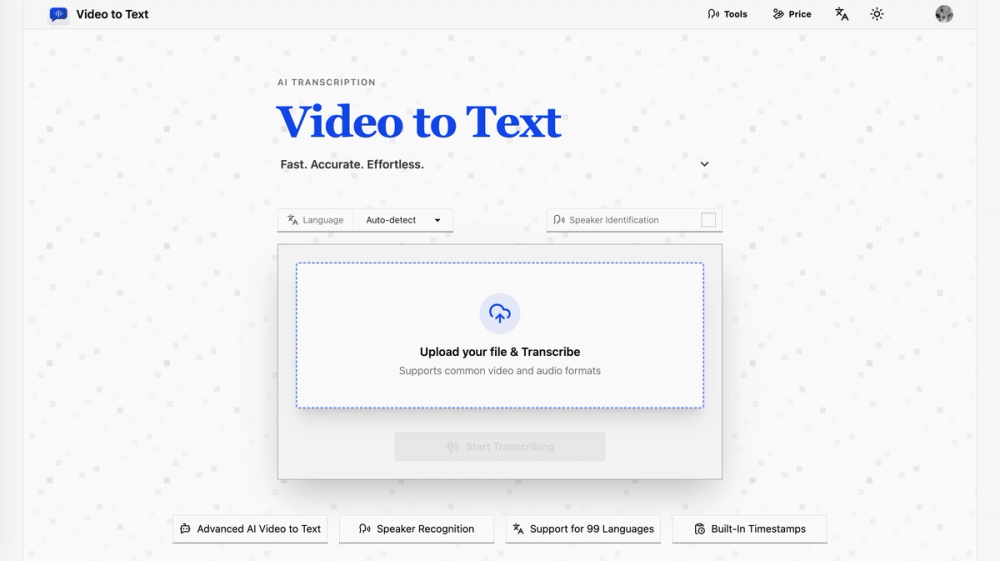
Video to Text: Revolutionizing Audio-Visual Content Transcription
In today's rapidly evolving digital landscape, the ability to efficiently and accurately convert spoken content into text is paramount. Whether for accessibility, searchability, content creation, or archival purposes, transcription services have become indispensable. Video to Text emerges as a leading solution, offering a robust, AI-powered platform designed to transform video and audio files into high-quality text transcripts with remarkable speed and precision.
This comprehensive service caters to a diverse user base, from content creators and educators to journalists and businesses, providing a seamless workflow from upload to export. With support for an extensive range of languages, advanced features like speaker identification and timestamping, and multiple export formats, Video to Text empowers users to unlock the full potential of their audio-visual content.
Core Functionality and AI-Powered Transcription
The cornerstone of Video to Text is its sophisticated AI engine, engineered to deliver highly accurate transcriptions. Unlike traditional manual transcription, which can be time-consuming and costly, Video to Text leverages cutting-edge machine learning models to process audio and video content at an unprecedented pace. The system analyzes spoken words, identifies nuances in speech, and generates a written representation with exceptional fidelity.
Key Features of the AI Transcription Engine:
- High Accuracy: The AI is trained on vast datasets, enabling it to understand various accents, dialects, and speaking styles, resulting in a high degree of accuracy. This minimizes the need for extensive manual correction.
- Speed and Efficiency: Transcribing hours of audio or video can be accomplished in a matter of minutes, significantly reducing turnaround times compared to manual methods. This is crucial for time-sensitive projects.
- Language Support: Video to Text boasts support for an impressive 99 languages, making it a truly global solution. This includes major languages like English, Spanish, French, German, Chinese, Japanese, and many more, with options for auto-detection, multi-language support, and specific language selection for maximum precision.
- Speaker Identification (Diarization): The service can automatically identify and label different speakers within a transcript. This feature is invaluable for interviews, podcasts, meetings, and any content involving multiple participants, providing clarity and organization.
- Timestamping: Each word or phrase in the transcript is associated with a precise timestamp, indicating when it was spoken in the original media. This facilitates easy navigation, review, and synchronization with video content for subtitle creation.
Seamless User Workflow
Video to Text is designed with user experience at its forefront, offering an intuitive and straightforward process:
- Upload: Users can easily upload their video or audio files directly through the web interface. The platform supports a wide array of common file formats, ensuring compatibility with most media.
- Configure Settings: Before transcription begins, users can select the language of the audio, enable speaker identification, and choose other relevant options.
- Transcribe: Once settings are configured, the AI engine takes over, processing the file to generate the transcript.
- Review and Edit: After transcription, users can review the generated text within an integrated editor. Minor corrections can be made directly, further enhancing accuracy.
- Export: The final transcript can be exported in various formats, including TXT, SRT, VTT, and CSV, catering to diverse downstream applications.
Supported File Formats
To ensure maximum convenience, Video to Text supports a broad spectrum of popular audio and video file formats:
- Video: MP4, MOV, MKV, WEBM, M4V
- Audio: MP3, WAV, M4A, FLAC, OGG, AAC, OPUS
This extensive support eliminates the need for users to convert their files beforehand, streamlining the entire process.
Export Options for Versatile Use Cases
The ability to export transcripts in multiple formats significantly enhances the utility of Video to Text:
- TXT (Plain Text): Ideal for simple text extraction, content analysis, or integration into documents.
- SRT (SubRip Text) & VTT (WebVTT): Standard formats for creating subtitles and closed captions for videos, compatible with most video players and editing software. These formats include timestamps for precise synchronization.
- CSV (Comma-Separated Values): Useful for importing transcript data into spreadsheets for further analysis, data management, or integration with other tools.
Target Users and Practical Applications
Video to Text serves a wide array of professionals and individuals who can benefit from accurate and efficient transcription:
- Content Creators (YouTubers, Podcasters, Social Media Managers): Generate subtitles for videos to improve accessibility and SEO, create engaging social media clips, and transcribe podcast episodes for wider reach and searchability.
- Educators and Students: Transcribe lectures, online courses, and study materials to create accessible learning resources, study notes, and revision aids.
- Journalists and Researchers: Quickly transcribe interviews, press conferences, and field recordings for accurate reporting, analysis, and archival purposes.
- Businesses and Professionals: Document meetings, webinars, client calls, and training sessions to ensure accurate records, facilitate knowledge sharing, and improve internal communication.
- Legal Professionals: Transcribe depositions, court proceedings, and client consultations for accurate documentation and case preparation.
- Accessibility Advocates: Make audio-visual content accessible to individuals with hearing impairments by providing accurate captions and transcripts.
- Language Learners: Use transcripts to follow along with audio content, improve comprehension, and practice pronunciation.
Unique Selling Propositions (USPs)
Several factors distinguish Video to Text in the competitive transcription market:
- Extensive Language Support: With 99 languages, it offers unparalleled linguistic coverage.
- Advanced AI Capabilities: High accuracy, speaker diarization, and timestamping powered by sophisticated AI.
- User-Friendly Interface: An intuitive design ensures ease of use for both beginners and advanced users.
- Flexible Export Options: Multiple formats cater to diverse needs.
- Generous Free Tier: New users receive 30 free minutes, allowing them to test the service thoroughly.
- Pay-As-You-Go Pricing: Flexible pricing models without mandatory subscriptions, offering cost-effectiveness.
Pricing and Free Tier
Video to Text adopts a transparent and flexible pricing structure. New users are greeted with a complimentary 30 minutes of transcription, providing an excellent opportunity to experience the service's capabilities firsthand. Beyond the free tier, users can opt for pay-as-you-go plans, purchasing transcription minutes in various bundles. This model ensures that users only pay for what they need, making it an economical choice for individuals and small businesses.
- Starter Pack: Offers 200 minutes for $9.9, equating to approximately $0.05 per minute.
- Most Popular Pack: Provides 600 minutes for $19.9, reducing the cost to about $0.033 per minute.
- Best Value Pack: Delivers 6000 minutes for $99, bringing the cost down to approximately $0.0165 per minute.
Additional minutes can be purchased at a rate of $1 for 20 minutes ($0.05 per minute) or $1 for 30 minutes ($0.033 per minute) depending on the chosen plan, offering further flexibility.
Technical Considerations and Security
Video to Text prioritizes data security and privacy. Uploaded files and generated transcripts are handled with care, adhering to industry best practices. While the platform is web-based, ensuring accessibility across devices, users are encouraged to export their transcripts for long-term storage, as temporary files are managed according to privacy policies.
The underlying technology relies on robust cloud infrastructure, enabling scalable processing power and high availability. The use of modern web technologies ensures a responsive and efficient user experience, even when handling large files or complex transcription tasks.
Conclusion
Video to Text stands out as a powerful and versatile AI transcription service. Its combination of high accuracy, extensive language support, advanced features like speaker identification and timestamping, user-friendly interface, and flexible pricing makes it an ideal solution for anyone needing to convert audio and video content into text. Whether you are a content creator looking to enhance your videos with subtitles, a researcher transcribing interviews, or a business documenting important discussions, Video to Text offers a reliable and efficient path to unlocking the value hidden within your spoken content.
The platform's commitment to continuous improvement, evident in its expanding language support and AI model enhancements, positions it as a go-to tool for the growing demands of the digital media landscape. By simplifying the transcription process, Video to Text democratizes access to valuable textual data derived from audio and visual sources, fostering greater accessibility, productivity, and insight.


