

Unblur Image: Revolutionizing Photo Clarity with Advanced AI
In the digital age, where visual content reigns supreme, the quality of an image can make or break its impact. Blurry, out-of-focus, or low-resolution photos often fail to capture attention, convey information effectively, or evoke the desired emotions. Recognizing this critical need, Unblur Image emerges as a powerful, AI-driven online tool designed to breathe new life into your visuals. It offers a comprehensive suite of solutions to tackle various forms of image degradation, from subtle motion blur to significant damage in old photographs.
Unblur Image is not just another photo editor; it's a specialized AI platform focused on image enhancement, particularly in deblurring and sharpening. Leveraging cutting-edge artificial intelligence and machine learning algorithms, the service aims to restore clarity, recover lost details, and improve the overall quality of images with remarkable speed and accuracy. Whether you're a professional photographer, an e-commerce seller, a social media enthusiast, or someone looking to preserve cherished memories, Unblur Image provides accessible and effective tools to achieve professional-looking results without the need for complex software or extensive editing skills.
Core Functionality and Scenarios:
The platform is built around distinct AI models, each trained to address specific types of image blur and degradation. This specialized approach ensures optimal results tailored to the user's needs:
-
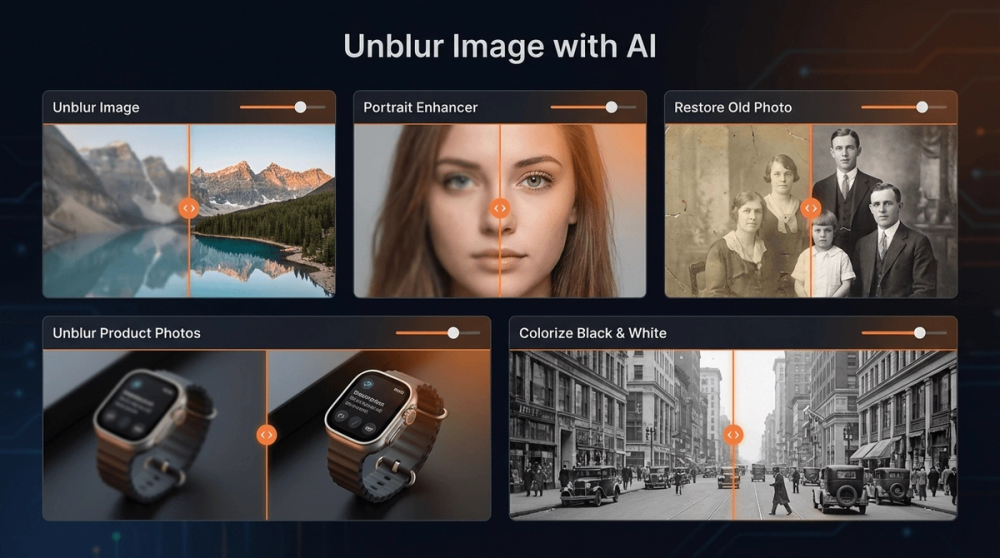
General Unblur Image (Lite & Pro): This is the flagship feature, designed to tackle common blur issues. Whether a photo is blurred due to camera shake, a missed focus, or low resolution, the AI works to sharpen the image, recover edges, and enhance overall clarity. The Lite version offers a good balance of speed and quality for everyday use, while the Pro version provides more advanced processing for critical applications like product photography or detailed landscapes.
- Use Cases: Sharpening product photos for online stores, improving screenshots for clarity, deblurring landscape shots, enhancing everyday snapshots.
- Key Features: Automatic blur detection, edge enhancement, texture recovery, noise reduction, fast processing.
-
Portrait Enhancer: Recognizing the unique challenges of portrait photography, this specialized AI model focuses on facial details. Blurriness in portraits can obscure crucial elements like eyes, skin texture, and hair. The Portrait Enhancer AI is trained to intelligently sharpen these features, bringing out the subject's expression and natural clarity without creating an artificial look. It's ideal for selfies, headshots, and group photos where facial details are paramount.
- Use Cases: Enhancing selfies for social media profiles, sharpening headshots for professional use, improving group photos where some subjects might be slightly out of focus.
- Key Features: Facial detail recovery (eyes, skin, hair), intelligent sharpening, natural skin tone preservation, high-quality output.
-
Restore Old Photo: This feature addresses the challenges of aging and damaged photographs. Old photos often suffer from fading, scratches, creases, and a general loss of sharpness due to the limitations of older photographic technology and the passage of time. The AI model is designed to not only sharpen these images but also to intelligently repair physical damage, restore contrast, and bring back the vibrancy that has been lost. It's a powerful tool for digitizing and preserving precious family memories.
- Use Cases: Restoring faded family portraits, repairing scratched or creased vintage photos, enhancing old scanned documents, bringing historical images back to life.
- Key Features: Damage repair (scratches, creases), contrast and color restoration, intelligent sharpening, preservation of original details.
-
Unblur Logo & Text: For businesses and designers, maintaining crisp logos and readable text is crucial for branding and communication. This feature specifically targets blurriness in logos, signage, documents, and any image where text clarity is essential. It sharpens lettering, brand marks, and fine details, ensuring professional presentation across all applications.
- Use Cases: Sharpening company logos for marketing materials, improving readability of scanned documents, enhancing text in presentations, clarifying signage in photos.
- Key Features: Text sharpening, logo clarity enhancement, edge definition for graphic elements, professional output.
Key Features and User Experience:
Unblur Image prioritizes user-friendliness and efficiency, making advanced AI technology accessible to everyone:
- Web-Based Platform: The service operates entirely online, eliminating the need for software downloads or installations. Users can access Unblur Image from any device with a web browser, whether it's a desktop, laptop, tablet, or smartphone.
- Intuitive Interface: The platform features a clean, user-friendly interface. The process typically involves selecting a scenario, uploading an image, and letting the AI do the work. Visual comparisons (before/after sliders) are often provided to showcase the enhancement results.
- Batch Processing: For users dealing with multiple images, Unblur Image offers batch processing capabilities. This allows users to upload and process up to 30 images simultaneously, significantly saving time and effort, especially for professionals working with large volumes of photos.
- Free Trial and Credits: The service offers a freemium model. Users receive daily free credits to try out the General Unblur Image Lite feature. Additional credits or subscription plans are available for accessing advanced features, Pro versions, batch processing, and higher-quality downloads.
- Fast Processing: The AI models are optimized for speed, delivering enhanced images in seconds, which is crucial for users who need quick results.
- High-Quality Output: The platform aims to provide high-resolution, watermark-free downloads for subscribed users, ensuring the enhanced images are ready for professional use.
Target Audience:
Unblur Image caters to a diverse user base:
- E-commerce Sellers: Need clear, sharp product photos to attract customers and improve conversion rates. Blurry images can deter potential buyers.
- Social Media Users & Content Creators: Require high-quality visuals for profiles, posts, and stories to maintain a professional or appealing online presence.
- Photographers (Amateur & Professional): Can use the tool to salvage slightly blurred shots or enhance portraits, saving time on manual editing.
- Individuals Preserving Memories: Want to restore and enhance old family photos, making them clearer and more shareable for future generations.
- Businesses and Designers: Need sharp logos, text, and graphics for marketing materials, presentations, and branding.
Unique Selling Points:
- Specialized AI Models: Unlike generic photo enhancers, Unblur Image offers tailored AI for specific blur types (portraits, old photos, text), leading to superior results.
- Ease of Use: The platform is designed for simplicity, requiring no prior editing experience.
- Efficiency: Batch processing and fast AI execution save valuable time.
- Accessibility: Web-based nature makes it available on any device.
In conclusion, Unblur Image stands out as a dedicated and powerful AI solution for anyone struggling with blurry or degraded images. Its combination of specialized AI models, user-friendly interface, efficient processing, and accessible pricing makes it an invaluable tool for enhancing visual content across a wide range of applications.


