

Read PDF Aloud: Your AI-Powered Companion for Seamless Document Comprehension
In today's fast-paced digital world, information is abundant, and the ability to consume it efficiently is paramount. Whether you're a student grappling with lengthy textbooks, a professional sifting through dense reports, or an avid reader who enjoys multitasking, the need for accessible and engaging ways to interact with documents is ever-growing. Read PDF Aloud emerges as a revolutionary solution, leveraging cutting-edge Artificial Intelligence to transform static PDF documents into dynamic, natural-sounding audio experiences.
This free, web-based tool is designed to break down barriers to information, making content more accessible and digestible than ever before. It goes beyond simple text-to-speech by offering a sophisticated AI-driven approach that ensures the audio output is not just understandable but also engaging and natural, mimicking human speech patterns with remarkable accuracy.
Core Functionality and Technology
At its heart, Read PDF Aloud is built upon a robust foundation of advanced AI and natural language processing (NLP) technologies. The core functionality revolves around its ability to accurately parse PDF documents, extract text content, and then synthesize this text into speech using high-quality AI voices.
1. Advanced PDF Parsing:
The tool employs sophisticated algorithms to analyze and extract text from a wide variety of PDF formats. This includes:
- Text-Based PDFs: For documents where the text is directly embedded, the extraction is highly accurate and efficient.
- Scanned PDFs: Utilizing Optical Character Recognition (OCR) technology, Read PDF Aloud can interpret text from images within scanned documents, making even older or image-based PDFs accessible.
- Complex Layouts: The system is designed to handle documents with intricate layouts, including multiple columns, tables, and embedded images, ensuring that the extracted text maintains its logical flow.
2. AI-Powered Text-to-Speech (TTS) Synthesis:
This is where Read PDF Aloud truly shines. Instead of relying on robotic, monotonous voices, the platform utilizes advanced AI models to generate speech that is:
- Natural and Human-like: The AI voices are trained on vast datasets of human speech, capturing nuances in intonation, rhythm, and pronunciation.
- Multilingual Support: With support for over 142 languages, the tool offers a truly global solution. Users can select from a wide array of languages and dialects, ensuring that content can be understood and enjoyed by a diverse audience.
- Voice Variety: Beyond language, users can choose from a selection of different AI voices within each language, often including male and female options with varying accents and tones, allowing for personalization and better content matching.
3. Local-First Processing and User Experience:
A key differentiator for Read PDF Aloud is its commitment to a "local-first" processing philosophy. This means that:
- Privacy Focused: A significant portion of the processing, including PDF parsing and text extraction, occurs directly within the user's browser. This minimizes the need to upload sensitive documents to external servers, enhancing user privacy and security.
- Speed and Efficiency: By processing locally, the tool reduces reliance on server load, leading to faster response times and a smoother user experience, especially for large documents.
- Offline Accessibility: The locally processed text can often be retained even after the browser is closed, allowing users to resume listening from where they left off, creating an experience akin to using a dedicated audiobook player.
4. User-Friendly Interface:
Read PDF Aloud boasts an intuitive and clean user interface, designed for ease of use regardless of technical expertise.
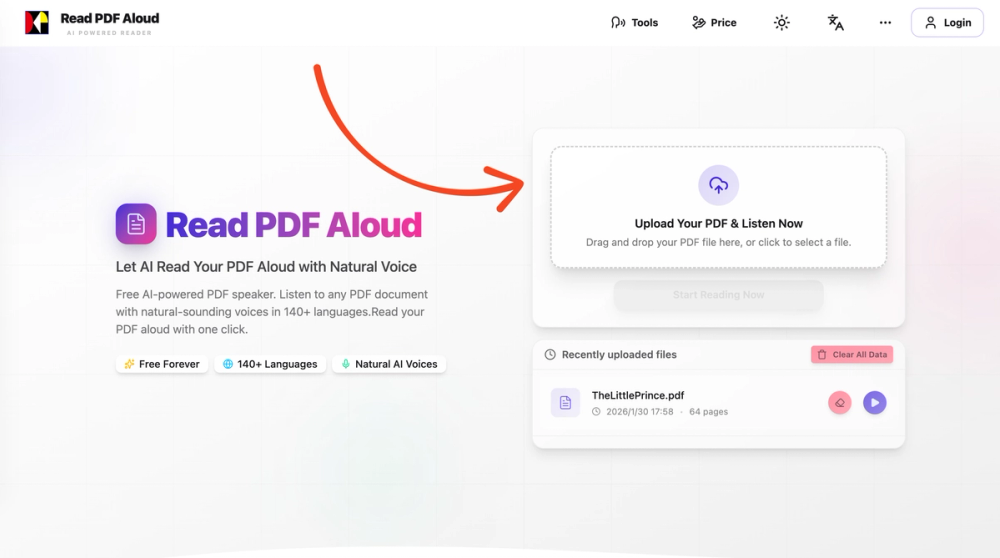
- Simple Upload: Users can easily upload PDF files via drag-and-drop or by selecting them from their device.
- Integrated Player: An embedded audio player provides controls for playback, pause, volume, and navigation within the document, allowing users to jump between sections or sentences.
- Cross-Platform Compatibility: The web-based nature ensures it works seamlessly across all modern devices and operating systems, including Windows, macOS, Linux, iOS, and Android, without requiring any app installation.
Key Features and Benefits
Read PDF Aloud offers a compelling set of features that cater to a wide range of user needs:
- Free to Use: The core functionality is entirely free, making advanced AI-powered document reading accessible to everyone.
- Extensive Language Support: With 142 languages, it's a global solution for multilingual users and content creators.
- Natural AI Voices: High-quality, human-like voices enhance the listening experience, making it more engaging and less fatiguing.
- Cross-Device Compatibility: Access your documents and listen from any device with a web browser.
- Privacy-Conscious: Local processing minimizes data exposure.
- Offline Resume: Ability to pick up where you left off, even after closing the browser.
- MP3 Export: Option to download the audio content for offline listening on any device or audio player.
- Intuitive Interface: Easy to use for beginners and advanced users alike.
Target Users and Use Cases
Read PDF Aloud is a versatile tool with applications for a broad spectrum of users:
-
Students:
- Study Aid: Listen to textbooks, research papers, and lecture notes to reinforce learning and improve retention.
- Multitasking: Absorb academic material while commuting, exercising, or doing chores.
- Accessibility: Provides an alternative way to consume content for students with reading difficulties like dyslexia.
-
Professionals:
- Report Analysis: Listen to business reports, market analyses, and legal documents while multitasking.
- Document Review: Efficiently review lengthy contracts or proposals without needing to read every word.
- Commute Learning: Stay updated with industry news and research during commutes.
-
Readers and Content Consumers:
- Audiobook Creation: Convert personal documents, e-books, or articles into custom audiobooks.
- On-the-Go Listening: Enjoy articles, blog posts, or any PDF content while driving, walking, or relaxing.
- Accessibility: Offers a convenient way for visually impaired individuals or those with reading fatigue to access written content.
-
Content Creators:
- Podcast Production: Transform written content into podcast episodes.
- Accessibility Features: Provide audio versions of written content for a wider audience.
-
Language Learners:
- Pronunciation Practice: Listen to and repeat content in various languages to improve pronunciation and fluency.
- Comprehension: Enhance understanding by hearing foreign language texts spoken by native-sounding AI voices.
Unique Selling Propositions (USPs)
Several factors set Read PDF Aloud apart from other text-to-speech solutions:
- True Free Access: Unlike many tools that offer limited free tiers, Read PDF Aloud provides its core, powerful features completely free of charge, including extensive language support and natural voices.
- Local-First Processing: This privacy-centric approach, combined with the efficiency and offline resume capabilities, offers a distinct advantage over cloud-dependent services.
- Exceptional Voice Quality: The AI-driven voices are among the most natural-sounding available, significantly improving the user experience compared to traditional TTS engines.
- Broad Device and OS Compatibility: Its web-based nature eliminates the need for specific software or app installations, offering unparalleled accessibility.
- MP3 Export: The ability to download audio files is a highly practical feature for users who need to listen offline or integrate the audio into other projects.
Technical Implementation and Architecture
The underlying architecture of Read PDF Aloud likely involves a combination of front-end technologies for the user interface and local processing, and potentially back-end services for managing updates or advanced features (though the emphasis on local processing suggests minimal back-end reliance for core TTS).
- Front-end Framework: The use of SvelteKit is evident from the script tags and file structure (
_app/immutable/entry/start.BaTCu8QH.js,_app/immutable/entry/app.CsS503By.js). SvelteKit is a modern web framework that allows for efficient client-side rendering and server-side rendering (SSR) or static site generation (SSG), contributing to fast load times and good SEO. - WebAssembly (WASM): For computationally intensive tasks like PDF parsing (especially OCR) and potentially parts of the TTS synthesis that are performed client-side, WebAssembly is a likely candidate. WASM allows high-performance code, often written in C++ or Rust, to run in the browser.
- JavaScript Libraries: Various JavaScript libraries would be employed for PDF manipulation (e.g., PDF.js for parsing), audio playback control, and potentially for integrating with browser APIs for speech synthesis if not fully handled by custom AI models.
- AI Models: The natural voices are powered by sophisticated AI models. These could be proprietary models developed by the creators or integrated from third-party AI voice providers, optimized for browser execution (e.g., via WebAssembly or efficient JavaScript implementations).
- Progressive Web App (PWA) Features: While not explicitly stated, the "local-first" approach and offline capabilities hint at potential PWA features, allowing for app-like experiences, including offline access and installation to the home screen.
Future Potential and Development
Read PDF Aloud has laid a strong foundation with its free, high-quality, and privacy-focused approach. Future developments could include:
- Enhanced OCR Accuracy: Continuous improvement of OCR for even better handling of low-quality scans.
- More Voice Options: Expanding the library of languages and voices, potentially including celebrity or custom voice cloning (with appropriate ethical considerations).
- Advanced Playback Controls: Features like adjustable reading speed, sentence highlighting synchronization, and bookmarking.
- Integration with Cloud Storage: Optional integration with services like Google Drive or Dropbox for easier access to documents.
- Collaboration Features: Allowing users to share audio versions of documents or collaborate on transcriptions.
- API Access: Offering an API for developers to integrate Read PDF Aloud's TTS capabilities into their own applications.
Conclusion
Read PDF Aloud is more than just a text-to-speech tool; it's a comprehensive solution designed to democratize access to information. By combining advanced AI, a user-centric design, and a commitment to privacy and affordability, it empowers users across the globe to engage with their PDF documents in a more dynamic, accessible, and enjoyable way. Whether for study, work, or leisure, Read PDF Aloud offers a powerful, free, and convenient way to listen to the written word.


