

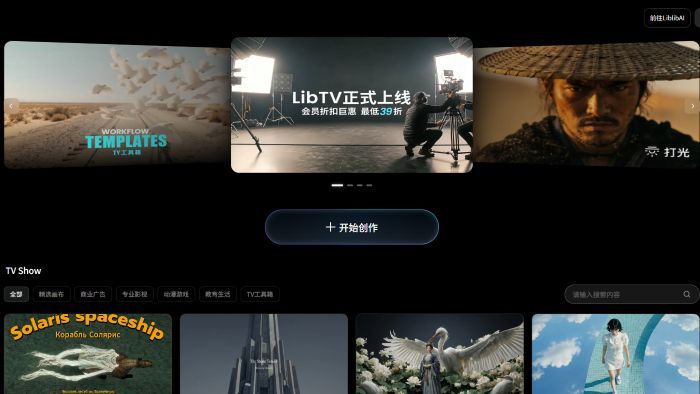
LibTV: Revolutionizing Video Creation with Professional Tools
LibTV emerges as a powerful and sophisticated platform dedicated to empowering creators with a comprehensive suite of professional video production tools. Designed with both novice and seasoned professionals in mind, LibTV aims to streamline the entire video creation workflow, from initial concept to final export. Its intuitive interface, coupled with advanced features, makes it an indispensable asset for anyone looking to produce high-quality video content efficiently.
Core Philosophy and Design Principles
At its heart, LibTV is built upon the principle of accessibility and power. The platform recognizes that video creation can be a complex and time-consuming process. Therefore, it prioritizes a user-centric design that balances ease of use with a robust feature set. This means that while beginners can quickly get started and produce impressive results, advanced users will find the depth and control they need for intricate projects.
The design philosophy also emphasizes speed and performance. In the fast-paced world of digital content, the ability to create and iterate quickly is crucial. LibTV is engineered to optimize rendering times, provide real-time feedback, and ensure a smooth editing experience, even with high-resolution footage.
Key Features and Functionality
LibTV offers a wide array of features that cater to various aspects of video production:
1. Intuitive Editing Interface:
The core of LibTV is its user-friendly timeline-based editor. It supports multi-track editing for video, audio, and graphics, allowing for complex layering and sequencing. Key features include:
- Drag-and-Drop Functionality: Easily import and arrange media clips on the timeline.
- Precise Timeline Control: Zoom in for frame-by-frame editing or zoom out for an overview of the entire project.
- Cut, Copy, Paste, and Trim Tools: Standard editing operations are readily available and optimized for speed.
- Split and Merge Clips: Effortlessly segment and combine video and audio segments.
- Undo/Redo History: A comprehensive history allows for easy reversion of changes.
2. Rich Media Library and Asset Management:
LibTV provides tools to organize and manage your project assets effectively:
- Import Various Formats: Supports a wide range of video, audio, and image file formats.
- Project Organization: Create folders and tags to categorize your media, making it easy to find what you need.
- Cloud Integration (Potential Future Feature): Seamlessly connect with cloud storage services for easy access to assets from anywhere.
3. Advanced Visual Effects and Transitions:
Elevate your videos with a comprehensive library of visual effects and transitions:
- Pre-built Transitions: A vast collection of transitions, from simple fades to dynamic wipes and zooms.
- Video Effects: Apply color correction, blurs, distortions, and other visual enhancements.
- Keyframing: Animate properties of clips, effects, and text over time for dynamic visual storytelling.
- Chroma Key (Green Screen): Easily remove backgrounds from footage for compositing.
- Picture-in-Picture: Overlay multiple video clips simultaneously.
4. Professional Audio Editing Tools:
Sound is half the picture, and LibTV offers robust audio capabilities:
- Multi-track Audio Editing: Mix dialogue, music, and sound effects on separate tracks.
- Audio Effects: Apply filters, EQ, normalization, and noise reduction to improve audio quality.
- Volume Control and Fading: Precisely manage audio levels and create smooth fades.
- Background Music and Sound Effects Library: Access a curated library of royalty-free audio assets.
5. Text and Title Creation:
Add professional titles, lower thirds, and text overlays to your videos:
- Customizable Text Templates: Choose from a variety of pre-designed text styles.
- Font and Style Options: Control font type, size, color, and alignment.
- Text Animation: Animate text elements for engaging introductions and outros.
6. Color Correction and Grading:
Achieve the perfect look and feel for your videos:
- Basic Color Adjustments: Modify brightness, contrast, saturation, and hue.
- Advanced Color Grading Tools: Utilize LUTs (Look-Up Tables) and color wheels for professional color grading.
- White Balance Correction: Ensure accurate color representation.
7. Export and Sharing Options:
Render your projects in various formats and resolutions suitable for different platforms:
- Multiple Export Presets: Choose from presets optimized for web, social media, and broadcast.
- Customizable Export Settings: Control resolution, frame rate, bitrate, and codec.
- Direct Sharing (Potential Future Feature): Export directly to popular video platforms.
Target Audience and Use Cases
LibTV is designed for a broad spectrum of users, including:
- Content Creators: YouTubers, vloggers, social media influencers who need to produce engaging video content regularly.
- Marketing Professionals: Businesses and agencies creating promotional videos, advertisements, and corporate communications.
- Educators and Trainers: Developing online courses, tutorials, and educational materials.
- Hobbyists and Enthusiasts: Individuals passionate about filmmaking and video editing looking for a powerful yet accessible tool.
- Small Business Owners: Creating product demos, explainer videos, and customer testimonials.
Specific Use Cases:
- Social Media Content: Quickly edit short, impactful videos for platforms like TikTok, Instagram Reels, and YouTube Shorts.
- YouTube Videos: Produce polished vlogs, tutorials, reviews, and documentaries.
- Marketing Campaigns: Create compelling video ads and promotional content.
- Online Courses: Develop professional-looking video lessons and modules.
- Personal Projects: Edit family events, travel videos, and creative short films.
Unique Selling Propositions (USPs)
What sets LibTV apart from other video editing software?
- Professional-Grade Features with User-Friendly Interface: LibTV strikes an ideal balance, offering advanced capabilities without overwhelming new users.
- Performance Optimization: Engineered for speed, ensuring a smooth and efficient editing experience, even with demanding projects.
- Comprehensive Toolset: Covers the entire video production pipeline, reducing the need for multiple specialized software.
- Focus on Efficiency: Streamlined workflows and intuitive controls help users save time and produce content faster.
- Potential for AI Integration: The platform's name, "LibTV," and its association with "Liblibai" suggest a potential future integration of AI-powered features for tasks like automated editing, content generation, or intelligent asset management, which would be a significant differentiator.
Technical Aspects and Architecture
While the specific technical architecture of LibTV is not fully detailed in the provided HTML, several clues point towards a modern web-based application, likely built using a framework like React or Vue.js, given the presence of next in the script and CSS file paths (_next/static/chunks/). The use of data-mantine-color-scheme and mantine- prefixed class names strongly indicates the use of the Mantine UI library, a popular React component library known for its utility and theming capabilities. This suggests a client-side rendering approach, possibly enhanced with server-side rendering or static site generation for performance and SEO benefits.
The extensive list of loaded JavaScript chunks (.js files in static/chunks/) indicates a modular architecture, where different functionalities are loaded on demand, optimizing initial page load times. The presence of turbopack in one of the script names suggests the use of Vercel's Turbopack for faster build times during development.
The CSS is also heavily component-based, with data-mantine-styles attributes, further reinforcing the use of Mantine. The styling also incorporates utility classes for responsive design (mantine-visible-from-md, mantine-hidden-from-md, etc.) and custom CSS variables for theming, particularly for dark mode (data-mantine-color-scheme="dark").
Future Potential and AI Integration
The name "LibTV" and the context of "Liblibai" strongly hint at a future where Artificial Intelligence plays a significant role in the platform's offerings. Potential AI-driven features could include:
- AI-powered Video Editing: Automated scene detection, intelligent clip selection, automatic rough cuts, and AI-assisted color correction.
- Content Generation: AI tools to generate video scripts, storyboards, or even short video clips based on text prompts.
- Smart Search and Tagging: AI to automatically tag video content, making it easier to search and organize large libraries.
- Voiceover and Narration: AI-generated voiceovers in multiple languages and styles.
- Upscaling and Enhancement: AI algorithms to improve the quality of low-resolution or old footage.
This potential integration of AI would position LibTV not just as a video editor, but as an intelligent video creation assistant, further differentiating it in a competitive market.
Conclusion
LibTV presents itself as a robust and user-friendly platform for professional video creation. Its comprehensive feature set, focus on performance, and intuitive design make it suitable for a wide range of users. With the potential for future AI integrations, LibTV is poised to become a leading tool in the evolving landscape of digital content production, empowering creators to bring their visions to life with greater ease and efficiency.


